Wire Cline — the open-source coding agent for VS Code — to AIgateway so you can pick any of the 1000+ models for plan and act. Five fields, one paid key, every model.
×
×
5
config fields
1
paid key
1000+
models
Cline is the most popular open-source coding agent for VS Code: it edits files, runs commands, and works through multi-step tasks autonomously. It speaks the OpenAI chat-completions shape, which means any model in the AIgateway catalog — Claude Opus 4.7, Kimi K2.6, GPT-5.4, Haiku 4.5, Gemini, Mistral — is one config screen away.
Five fields, copy-paste. Then pick a model for Plan mode and (optionally) a cheaper one for Act mode.
Configure the provider
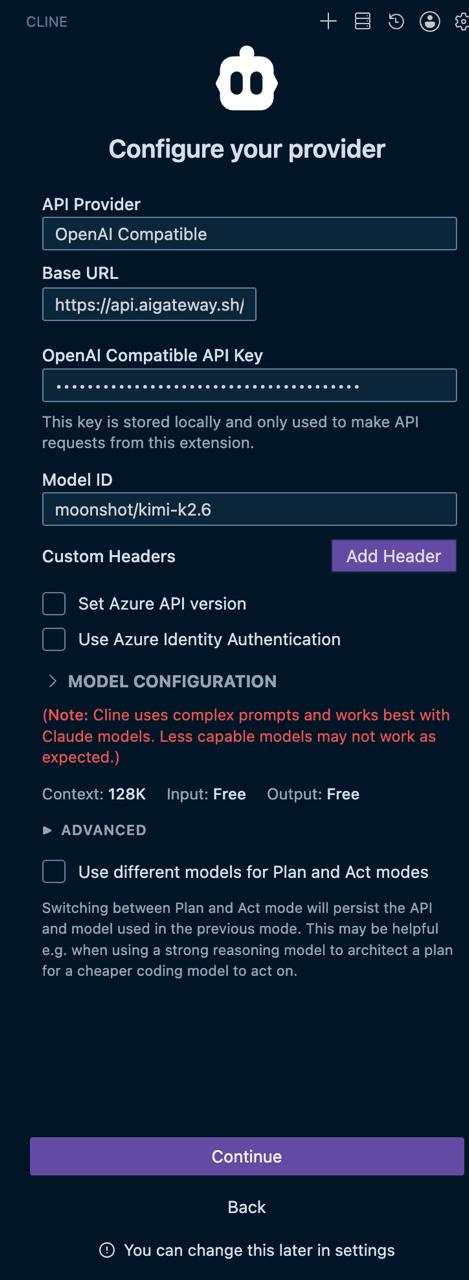
Open Cline's settings (the gear icon in the side panel), choose Configure your provider, and fill in:
1API Provider — OpenAI Compatible.
2Base URL — https://api.aigateway.sh/
3OpenAI Compatible API Key — paste your sk-aig-… from the dashboard.
4Model ID — the full catalog slug (here moonshot/kimi-k2.6; also try anthropic/claude-opus-4.7 or anthropic/claude-haiku-4.5).
5Custom Headers — leave empty. Cline doesn't need them for AIgateway.
Cline → Configure your provider, populated with AIgateway.
Pick a model
Cline's own guidance says it works best with high-capability models because it uses long, complex prompts. Three reasonable defaults from the AIgateway catalog:
anthropic/claude-opus-4.7 — best overall coding intelligence, most expensive. Default for serious work.
moonshot/kimi-k2.6 — frontier open agent model, 256K context, native tool calling. Significantly cheaper than Opus while staying close on agentic benchmarks.
anthropic/claude-haiku-4.5 — fastest and cheapest Anthropic. Pair with Opus in Plan/Act mode (Opus plans, Haiku acts).
Plan and Act with different models
Cline can use one model to draft the plan and a different (usually cheaper or faster) one to execute it step-by-step. Open Advanced → Use different models for Plan and Act modes.
Common combo: Opus 4.7 in Plan mode (it's the one that needs to think hard about the architecture), Haiku 4.5 or Kimi K2.6 in Act mode (these run the dozens of small edits where speed matters more than depth).
You'll spend ~60–80% less compared to running Opus end-to-end on a multi-step task, with almost no quality drop on the execution side.
Get a key
Sign in at aigateway.sh and create a key from the Keys page. Add credits in Billing — pay-as-you-go, no minimums beyond the first $5 top-up.
Every key minted from a paying account is automatically on the paid tier (10,000 rpm). If you signed up before mid-May 2026 and topped up but your old keys are stuck at 10 rpm, generate a new key — it will inherit paid-tier limits.
Troubleshooting
Cline says "401 Unauthorized": the key is wrong or has a trailing space. Re-reveal it from the dashboard and paste fresh.
"Model not found": use the full slug from aigateway.sh/models — e.g. anthropic/claude-opus-4.7, not just opus or claude-3-opus.
Rate-limit errors after a few calls: your key is still on the free 10-rpm tier. Generate a new key now that you've topped up, or contact support to promote the existing one.
Anything else: open the Output panel in VS Code, filter for "Cline", and check the request URL it actually called. That tells you whether the issue is in Cline's config, your network, or AIgateway.
Same recipe works for
Continue, Cursor (via OpenAI-compatible config), Cody, Aider (--openai-api-base flag), Zed, and any other coding agent that accepts a custom OpenAI-compatible base URL. The only fields that ever change are the base URL, the key, and the model slug.
Ready to ship?
One paid key. Every model in the catalog. Pass-through pricing, pay-as-you-go.